The disease arising in Wuhan-China,is the COVID-19 disease first known as the coronavirus disease (COVID–19). The "CO" is the corona disease and "VI" is the virus, and "D" the disease. This disease has historically been labeled as "novel 2019 coronavirus" or "2019-nCoV."
The COVID-19 is a new virus that has been linked with the same family of viruses, such as SARS and some common colds. Hence as part of raising awareness, in today's article, Elif Coding comes out with how to create COVID-19 walkthrough screen design in android studio.
The COVID-19 is a new virus that has been linked with the same family of viruses, such as SARS and some common colds. Hence as part of raising awareness, in today's article, Elif Coding comes out with how to create COVID-19 walkthrough screen design in android studio.
WHAT IS WALKTHROUGH SCREEN OR ONBOADING SCREEN?
In modern times, the first time users display onboard screens has become a popular occurrence in mobile applications. The aim of these onboard displays also called "WALKTHROUGH SCREEN" is to introduce the application and demonstrate what it does. Since these are often the first set of screens to communicate with users, the users anticipate the app.
Those involved in product development,project managers, designers and developers must then take the time to decide if onboarding is required for the application, and, if so, to determine how to execute it best.

XML LAYOUT DESIGN
- First Download XD design and Export the design as drawables
- After exporting, import drawables to your android studio project as drawables.
- Download Gotham and Monsterrat fonts.
- Create Android Resource directory and paste downloaded font in that directory name font
- create new android layout activity name slider_layout.
- Copy and paste this xml code in the newly created slider_layout
slider_layout.xml
<?xml version="1.0" encoding="utf-8"?>
<androidx.constraintlayout.widget.ConstraintLayout xmlns:android="http://schemas.android.com/apk/res/android"
    xmlns:app="http://schemas.android.com/apk/res-auto"
    xmlns:tools="http://schemas.android.com/tools"
    android:layout_width="match_parent"
android:layout_height="match_parent">

    <ImageView
        android:id="@+id/imageView"
        android:layout_width="wrap_content"
        android:layout_height="wrap_content"
        android:layout_marginStart="8dp"
        android:layout_marginTop="90dp"
        android:layout_marginEnd="8dp"
        android:src="@drawable/s_distance_img"
        app:layout_constraintEnd_toEndOf="parent"
        app:layout_constraintStart_toStartOf="parent"
        app:layout_constraintTop_toTopOf="parent" />

    <TextView
        android:id="@+id/textView"
        android:layout_width="wrap_content"
        android:layout_height="wrap_content"
        android:layout_marginStart="8dp"
        android:layout_marginTop="32dp"
        android:layout_marginEnd="8dp"
        android:fontFamily="@font/gotham_medium"
        android:text="HEADING"
        android:textStyle="bold"
        android:textColor="#372B7B"
        android:textSize="20sp"
        app:layout_constraintEnd_toEndOf="parent"
        app:layout_constraintStart_toStartOf="parent"
        app:layout_constraintTop_toBottomOf="@+id/imageView" />

    <TextView
        android:id="@+id/description"
        android:layout_width="wrap_content"
        android:layout_height="wrap_content"
        android:layout_marginStart="8dp"
        android:layout_marginTop="8dp"
        android:layout_marginEnd="8dp"
        android:fontFamily="@font/montserrat"
        android:padding="10dp"
        android:text="Avoid close contact with people who are sick. When you are sick, keep your distance from others to protect them from getting sick too."
        android:gravity="center"
        android:textColor="#3A2F81"
        android:textSize="16sp"
        app:layout_constraintEnd_toEndOf="parent"
        app:layout_constraintStart_toStartOf="parent"
        app:layout_constraintTop_toBottomOf="@+id/textView" />

</androidx.constraintlayout.widget.ConstraintLayout>
- In the activity_main paste this xml code
activity_main.xml
<?xml version="1.0" encoding="utf-8"?>
<RelativeLayout xmlns:android="http://schemas.android.com/apk/res/android"
    xmlns:app="http://schemas.android.com/apk/res-auto"
    xmlns:tools="http://schemas.android.com/tools"
    android:layout_width="match_parent"
    android:layout_height="match_parent"
    android:background="@drawable/app_bg"
    android:orientation="vertical"
    tools:context=".MainActivity">

    <androidx.viewpager.widget.ViewPager
        android:id="@+id/viewpager"
        android:layout_width="match_parent"
        android:layout_height="match_parent"
        app:layout_constraintBottom_toBottomOf="parent"
        app:layout_constraintEnd_toEndOf="parent"
        app:layout_constraintStart_toStartOf="parent"
        app:layout_constraintTop_toTopOf="parent">

    </androidx.viewpager.widget.ViewPager>


    <TextView
        android:id="@+id/back"
        android:layout_width="wrap_content"
        android:layout_height="wrap_content"
        android:layout_alignParentStart="true"
        android:layout_alignParentBottom="true"
        android:layout_marginStart="20dp"
        android:layout_marginBottom="20dp"
        android:fontFamily="@font/gotham_medium"
        android:text="@string/back"
        android:textColor="#3A2F81"
        android:textSize="16sp"
        android:textStyle="bold" />


    <TextView
        android:id="@+id/next"
        android:layout_width="wrap_content"
        android:layout_height="wrap_content"
        android:layout_alignParentEnd="true"
        android:layout_alignParentBottom="true"
        android:layout_marginEnd="20dp"
        android:layout_marginBottom="20dp"
        android:fontFamily="@font/gotham_medium"
        android:text="@string/next"
        android:textColor="#3A2F81"
        android:textSize="16sp"
        android:textStyle="bold" />

</RelativeLayout>
- Create a new Java Class named SliderAdapter
- Paste this java code in the newly created java class
SliderAdapter.java
package com.ayowainc.ob;

import android.content.Context;
import android.view.LayoutInflater;
import android.view.View;
import android.view.ViewGroup;
import android.widget.ImageView;
import android.widget.TextView;

import androidx.annotation.NonNull;
import androidx.constraintlayout.widget.ConstraintLayout;
import androidx.viewpager.widget.PagerAdapter;

public class SliderAdapter extends PagerAdapter {

    private Context context;

    SliderAdapter(Context context) {
        this.context = context;
    }

    //Arrays
    private int[]slider_images = {
            R.drawable.s_distance_img,
            R.drawable.wash_hands_img,
            R.drawable.stay_home_img,
            R.drawable.cover_mouth_img,
            R.drawable.disinfect_img,
            R.drawable.elif_logo
    };

    private String[]headings = {
            "AVOID CLOSE CONTACT", "CLEAN YOUR HANDS","STAY HOME","COVER MOUTH","CLEAN AND DISINFECT","INFO FROM ELIF"
    };

    private String[]descriptions = {
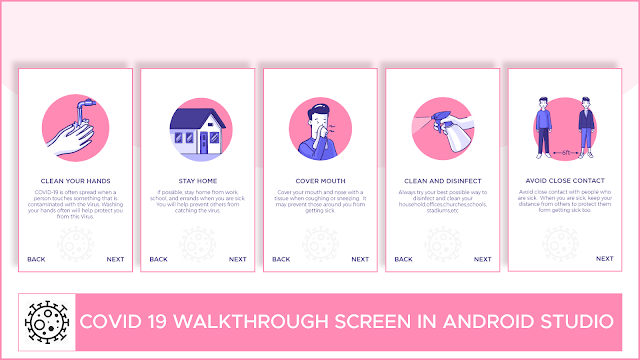
            "Avoid close contact with people who are sick.  When you are sick, keep your distance from others to protect them form getting sick too.",
            "COVID-19 is often spread when a person touches something that is contaminated with the Virus. Washing your hands often will help protect you from this Virus.",
            "If possible, stay home from work, school, and errands when you are sick.  You will help prevent others from catching the virus.",
            "Cover your mouth and nose with a tissue when coughing or sneezing.  It may prevent those around you from getting sick.",
            "Always try your best possible way to disinfect and clean your household,offices,churches,schools, stadiums,etc",
            "Hey! Viewers COVID-19 is real, let's come together and fight this noveal virus from our society. Please Stay Home, Stay Safe and Subscribe"
    };

    @Override
    public int getCount() {
        return headings.length;
    }

    @Override
    public boolean isViewFromObject(@NonNull View view, @NonNull Object object) {
        return view == (ConstraintLayout) object;
    }

    @NonNull
    @Override
    public Object instantiateItem(@NonNull ViewGroup container, int position) {
        LayoutInflater layoutInflater = (LayoutInflater) context.getSystemService(Context.LAYOUT_INFLATER_SERVICE);
        View view = layoutInflater.inflate(R.layout.activity_slide_layout, container, false);

        ImageView sliderImages = (ImageView) view.findViewById(R.id.imageView);
        TextView sliderHeading = (TextView)view.findViewById(R.id.textView);
        TextView sliderDesc = (TextView) view.findViewById(R.id.description);

        sliderImages.setImageResource(slider_images[position]);
        sliderHeading.setText(headings[position]);
        sliderDesc.setText(descriptions[position]);

        container.addView(view);
        return view;

    }

    @Override
    public void destroyItem(@NonNull ViewGroup container, int position, @NonNull Object object) {
        container.removeView((ConstraintLayout)object);
    }
}
- In the MainActivity.java paste this line of code
MainActivity.java
package com.ayowainc.ob;

import android.os.Bundle;
import android.view.View;
import android.view.WindowManager;
import android.widget.TextView;

import androidx.appcompat.app.AppCompatActivity;
import androidx.viewpager.widget.ViewPager;

public class MainActivity extends AppCompatActivity {
    private ViewPager slideViewPager;
    private TextView Next, Back;

    @Override
    protected void onCreate(Bundle savedInstanceState) {
        getWindow().setFlags(WindowManager.LayoutParams.FLAG_FULLSCREEN, WindowManager.LayoutParams.FLAG_FULLSCREEN);
        super.onCreate(savedInstanceState);
        setContentView(R.layout.activity_main);

        slideViewPager = (ViewPager) findViewById(R.id.viewpager);
        Next = findViewById(R.id.next);
        Back = findViewById(R.id.back);
        Back.setVisibility(View.INVISIBLE);

        SliderAdapter sliderAdapter = new SliderAdapter(this);
        slideViewPager.setAdapter(sliderAdapter);

        Next.setOnClickListener(new View.OnClickListener() {

            @Override
            public void onClick(View view) {
                slideViewPager.setCurrentItem(slideViewPager.getCurrentItem() + 1, true);
            }
        });


        Back.setOnClickListener(new View.OnClickListener() {

            @Override
            public void onClick(View view) {
                slideViewPager.setCurrentItem(slideViewPager.getCurrentItem() - 1, true);
            }
        });

        slideViewPager.addOnPageChangeListener(new ViewPager.OnPageChangeListener() {
            private int i;
            private float v;
            private int i1;

            @Override
            public void onPageScrolled(int i, float v, int i1) {

                this.i = i;
                this.v = v;
                this.i1 = i1;
            }

            @Override
            public void onPageSelected(int position) {
                if (position == 0) {
                    Back.setVisibility(View.INVISIBLE);
                } else {
                    Back.setVisibility(View.VISIBLE);
                }
                if (position < slideViewPager.getAdapter().getCount() - 1) {
                    Next.setVisibility(View.VISIBLE);
                } else {
                    Next.setVisibility(View.INVISIBLE);
                }
            }

            @Override
            public void onPageScrollStateChanged(int i) {

                this.i = i;
            }
        });
    }


}

Run the code and see the outcome. Hey! Viewers COVID-19 is real, let's come together and fight this novel virus from our society. Please Stay Home, Stay Safe and Subscribe to my youtube channel.